
Module in AI Marketing Manager
AI agents that do the work, and answer for what they did
Ask Cita, the assistant inside Manager, or connect the agent you already use. It reads your projects, makes the change you asked for and writes it to the action log, so you always know what was done, by whom and with what result.
AI agents and MCP is the module in CitationLab AI Marketing Manager that lets AI agents work in the platform on your behalf. You can use the built-in assistant Cita, connect your own agent, such as Claude, ChatGPT or Cursor, through the MCP connector with OAuth sign-in, or build on the REST API. Agents act under your permissions, and every change they make is logged as an action you can follow up and measure.
01The problem
An AI that can only talk leaves the work to you
Most AI assistants stop at the advice. They suggest a better meta description or a new negative keyword, and someone still has to log in, find the right screen and make the change. The bottleneck isn't ideas, it's execution.
When agents do get access, it tends to be through a shared password, an API key pasted into a chat or a browser script that clicks around. Afterwards nobody can say what the agent changed, in which account, or whether it was allowed to.
Manager gives agents a proper way in. The same data, the same permissions and the same action log as the people on your team, whether the work is done by Cita, by your own agent or by a scheduled agent that runs while you sleep.
02How it works
How it works
- 01 / 04
Pick your agent
Open Cita in Manager, or add the connector URL to Claude, ChatGPT, Claude Code, Cursor or any other client that supports MCP. Developers can use the REST API with an API key instead.
- 02 / 04
Approve the access
You sign in and choose what the agent may do: read only, read and write, or delete as well. You can limit it to certain projects and modules. There is no key to paste into the assistant.
- 03 / 04
Ask for the work
Ask a question or hand over a task in plain language: which pages lost clicks this month, add these keywords to a list, pause the weakest campaign. Before Cita changes anything in a live system, it shows you what it will do and asks for your approval.
- 04 / 04
Every change stays on record
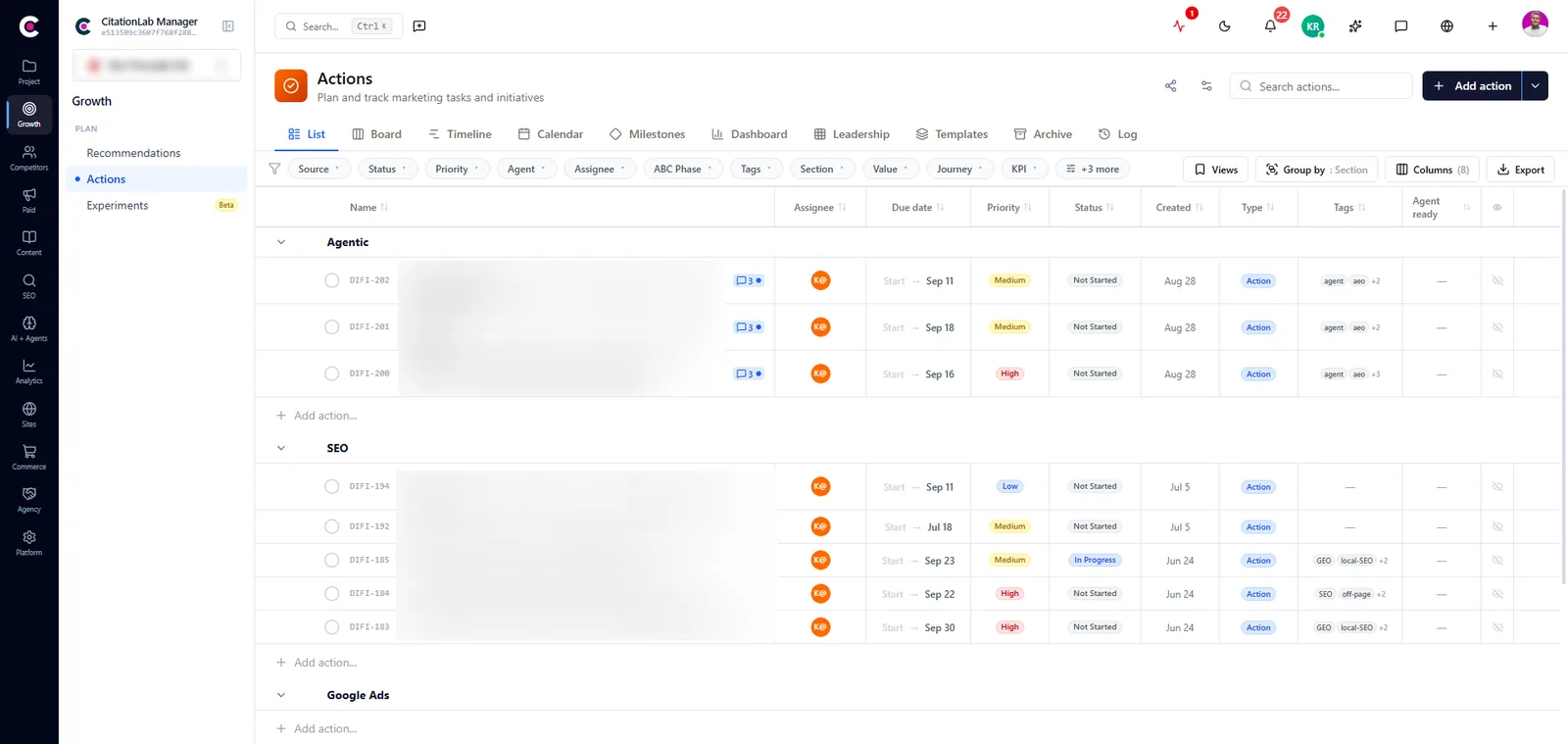
Real changes, like publishing a page, changing a budget or adding keywords, are logged as actions in the project. Changes to pages are followed up with post-analysis, so you see whether the agent's work paid off.
03Inside
What you get
Cita, the assistant that executes
Cita works inside Manager with your project data at hand. It can answer, but it can also act: publish to your CMS, adjust a campaign, add keywords, run an analysis. You choose whether it does the job or guides you through doing it yourself.
Bring your own agent
The MCP connector lets Claude, ChatGPT, Cursor or your own agent work across the modules you have access to, with OAuth sign-in and a first-run tour built from your own projects.
A REST API for your own integrations
Everything agents can use is also available as a REST API with an API key and an OpenAPI description, for scripts, internal tools and data flowing into other systems.
Never more access than you
An agent acts as the user who connected it and can never reach more than that user can. You set the access level, the projects and the modules, and you can disconnect any app at once under Settings.
Scheduled agents with a ceiling you set
Let agents run on a schedule or when something happens. For each one you decide whether it only reports, queues its changes for approval or applies them itself. Changes held back wait in an approvals list until someone says yes.
Forms that agents can use
Forms in Manager are agent-ready in the browser, so an agent working in your session can fill them in and submit them through the same validation and checks as a person, with no screen scraping.
From Manager
04The outcome
What it changes day to day
- Routine changes take minutes, without anyone clicking through five screens
- You use the AI tools you already pay for, connected to your own marketing data
- Every change an agent makes can be traced: what, where, when and on whose behalf
- Changes to live accounts and pages wait for a yes when you want them to
- Work done by agents is measured to the same standard as the team's
05FAQ
Questions about AI agents and MCP
- Which AI agents can I connect?
- Any client that supports remote MCP connectors, such as Claude (web, desktop, mobile and Claude Code) and ChatGPT. Editors like Cursor that only support local MCP connect through a small bridge. Step-by-step setup is on the MCP connector page under Resources.
- Can an agent do things I'm not allowed to do?
- No. The agent always acts as you and is limited to what your user can reach. On top of that, you can narrow it to read only, specific projects or specific modules.
- How do I see what an agent changed?
- Every real change, such as a publication, a budget change or new keywords, is written to the project's action log. Reads, drafts and analyses are not logged, so the log shows what actually changed.
- Can I hand a task to Cita?
- Yes. Assign an action to Cita and it works on it by itself, as long as the project allows agents to apply changes. Finished work stays on the action, and anything Cita can't complete comes back to you with an explanation.
- Do I need to be a developer?
- No. Cita is part of Manager, and connecting Claude or ChatGPT takes a URL and a sign-in. The REST API is there for teams that want to build their own integrations.
06More modules
It connects to everything else
- ActionsEvery finding, recommendation and change becomes a tracked action with an owner, a priority, a readable key and a measured result.
- Post-analysisAutomatically measures whether a change to a page actually moved clicks, traffic and conversions, after 7, 14 and 28 days.
- WordPress pluginA complete SEO plugin for WordPress with tools for AI search, connected to Manager so changes to your site are logged and measured.
- Lab BrainReads across modules, forecasts where your KPIs are heading and gives prioritised recommendations that learn from what actually worked.
Try AI agents and MCP on your own site
Create an account and set up your first project in a few minutes.
Was this page helpful?