
Module in AI Marketing Manager
All work becomes an action, and every action gets a result
A Lab Brain finding, a row behind a falling KPI, a change an AI agent made overnight: in Manager it all becomes an action with an owner, a priority and a deadline. Once the action is done, it is measured on whether it moved the numbers.
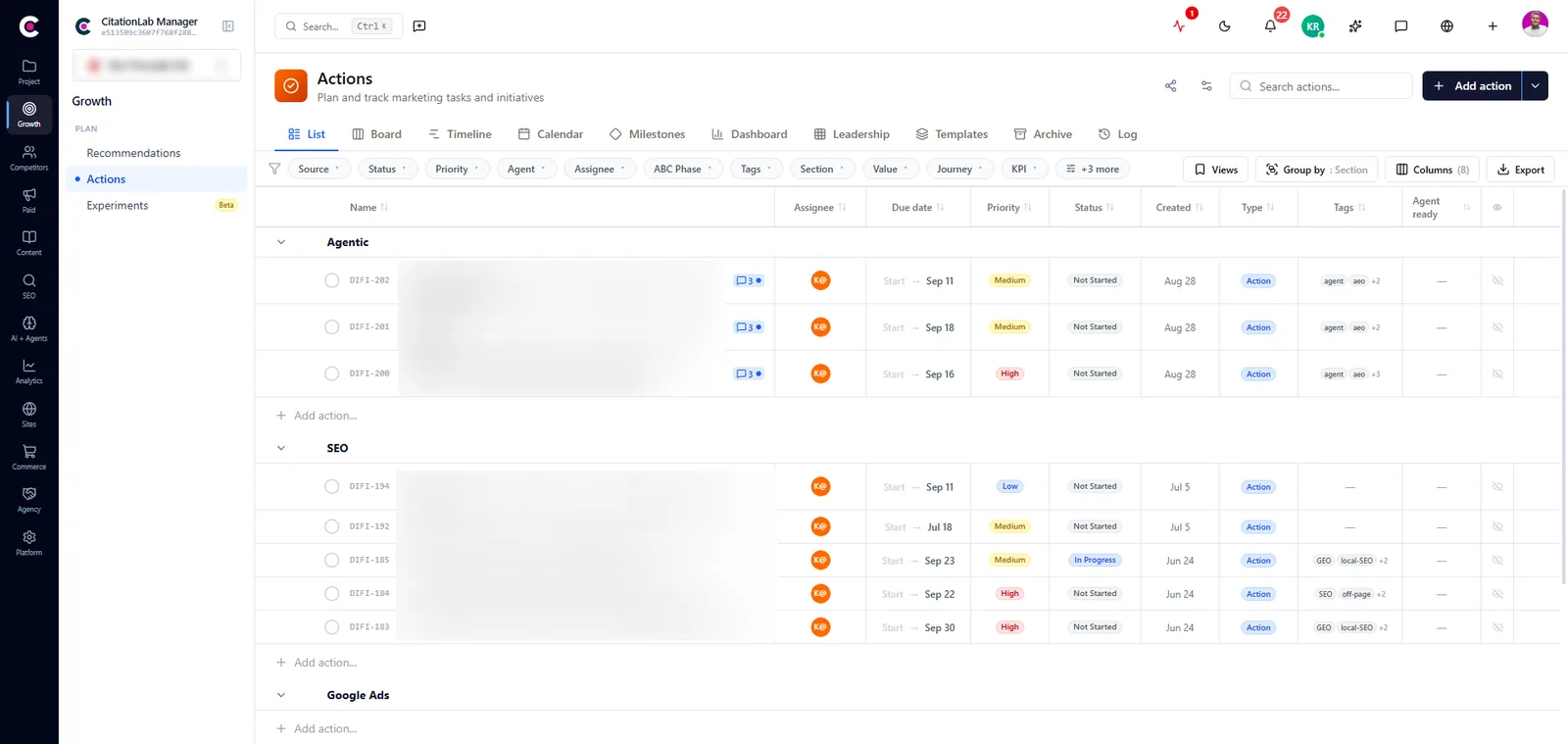
Actions is the module in CitationLab AI Marketing Manager that turns all marketing work into tracked actions. Each action has an owner, a priority, a status, dates and a readable key like ELNO-142, and can be linked to the page it changes and the KPI it should move. Recommendations become actions in one click, and changes made by AI agents are logged automatically. When an action is done, its impact is measured.
01The problem
To-do lists forget what happened
Marketing work is spread across a project tool, an inbox, a spreadsheet and the head of whoever did the job. The task gets ticked off, and with it goes why it was done, which page it touched and what was meant to improve.
AI agents make this worse. An agent can publish a page or adjust a budget in seconds, and without a record nobody knows what was changed, when, or by whom.
Actions puts it all in one place. Findings, recommendations and changes by people and agents become tracked actions tied to the page and the KPI they concern, so every action can be held to its result.
02How it works
How it works
- 01 / 04
A finding becomes an action
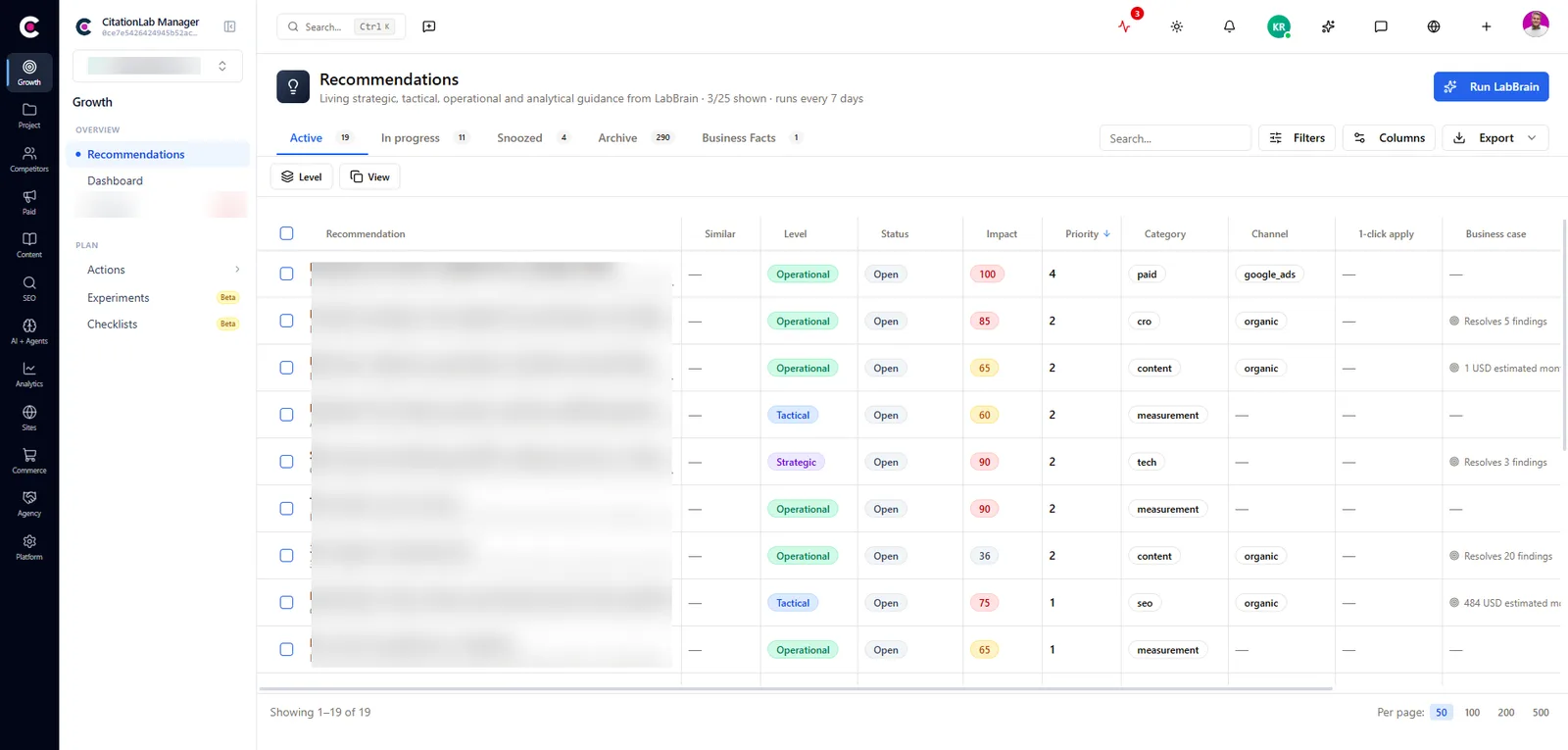
Turn a Lab Brain or Cite Audit recommendation into an action in one click, right-click a query or page behind a KPI that moved, or create an action yourself. The action arrives briefed with the numbers and the steps, not as an empty title.
- 02 / 04
It gets an owner and a direction
Set the owner, priority, start and due date, and link the action to the page it changes and the KPI it should move. Every action gets a key like ELNO-142, so everyone knows which project it belongs to.
- 03 / 04
The work is done and documented
You, a colleague or an AI agent does the work. Documentation, comments, attachments and images from the Media Library live on the action, and owners are reminded as the deadline approaches or passes.
- 04 / 04
Done means measured
When an action with a linked page is marked done, a before and after measurement of that page starts. If it is linked to a KPI, Lab Brain measures whether the number actually moved.
03Inside
What you get
Readable keys
Every action has a key like ELNO-142, the project's prefix and a running number. Use it in meetings, reports and messages, and everyone knows which action and which project you mean.
An audit trail for AI agents
When an AI agent connected over MCP publishes a page, pauses a campaign or changes a budget, the change is logged as a completed action. Drafts and lookups are not logged, so the list stays a record of real changes.
Epics, actions and subtasks
Group larger work into epics, break actions into subtasks, and see it all as a list, board, timeline or calendar, with filters on status, priority, owner, KPI and more.
Fields that fit the project
Each project chooses which fields an action carries and adds its own fields and categories. An SEO retainer and a booking client don't have to look the same.
A report of the work done
Pull every action completed in a period into a report with hours and a split by category, or export a single action as a PDF. The client copy keeps only actions marked as visible to the client.
Rows that remember what was done
Queries and pages behind a KPI show whether they already have an action, with its key and status. The same row doesn't get diagnosed twice by two people in the same week.
From Manager
04The outcome
What it changes day to day
- No finding is left without an owner
- You always know who changed what, including when it was an AI agent
- Reporting to clients or leadership is built from the work that was actually done
- Every completed action with a linked page or KPI produces a measured result
- Lab Brain learns from your actions and ranks the next round by what worked
05FAQ
Questions about actions
- What is the difference between an action and an ordinary task?
- An action is the record of marketing work. It has a key, can be linked to a page and a KPI, is part of the audit trail and is measured for impact. An ordinary task is just something to do.
- How does a recommendation become an action?
- In one click. You see what the action will inherit before it is created, such as the description, goal and KPI, and set the title, priority, due date and owner right there. When the work is done, the recommendation closes.
- Are changes made by AI agents logged?
- Yes. When an agent connected to Manager over MCP or the API makes a real change, a completed action is written that says what was done. Drafts, lookups and analysis are not logged.
- How is the impact of an action measured?
- Link the action to the page it changes, and a before and after measurement with Search Console and GA4 data starts when it is marked done. Link it to the KPI it should move, and Lab Brain measures whether the number changed.
- Can I share actions with a client?
- Yes. You can export an action, an epic or a period's work as a PDF. The client copy keeps only actions marked as visible to the client and leaves out internal planning fields.
06More modules
It connects to everything else
- Post-analysisAutomatically measures whether a change to a page actually moved clicks, traffic and conversions, after 7, 14 and 28 days.
- Lab BrainReads across modules, forecasts where your KPIs are heading and gives prioritised recommendations that learn from what actually worked.
- AI agents and MCPLet Cita, the assistant in Manager, or your own agent in Claude, ChatGPT or Cursor do the work, under your permissions and with every change logged.
- ReportingKPIs that collect themselves, dashboards you can share with a link, and scheduled reports delivered by email.
Try actions on your own site
Create an account and set up your first project in a few minutes.
Was this page helpful?