
Module in AI Marketing Manager
From brief to published page, without switching tools
Planning, writing, checking and publishing happen in the same project as your keywords, personas and competitors. When an article goes out to your CMS, the change is logged against the URL and its impact is measured.
Content and publishing is the module in CitationLab AI Marketing Manager that brings content work together, from plan to published page. It covers the Content Planner, the article writer in Blogger, URL Manager and the Media Library, and publishes directly to WordPress, HubSpot, Prepr, Contentful, Umbraco, Webflow, Wix and Sanity. Every publish is recorded against the URL it touched, so its impact can be measured afterwards.
01The problem
Content is made in five tools and measured in none
The plan lives in a spreadsheet, the brief in a document, the draft in an AI chat, the publishing in the CMS, and the record of which pages changed in someone's head. Every handover loses something: the persona, the keyword, the angle or the date.
AI has made text cheap to produce, but not text worth citing. A draft written without knowing the audience, the competitors and what people actually ask turns into generic filler that neither ranks in Google nor gets cited by ChatGPT and Gemini.
Content and publishing keeps the whole chain in one project. The brief builds on what you already know about the business, the draft is checked before it goes out, and publishing leaves a trail that makes the result measurable.
02How it works
How it works
- 01 / 04
Plan what to make
The Content Planner shows the plan as a calendar, a list or a Gantt chart. Its strategy tab suggests both new content and existing pages worth improving, and the suggestions you accept go straight into the calendar.
- 02 / 04
Write from a proper brief
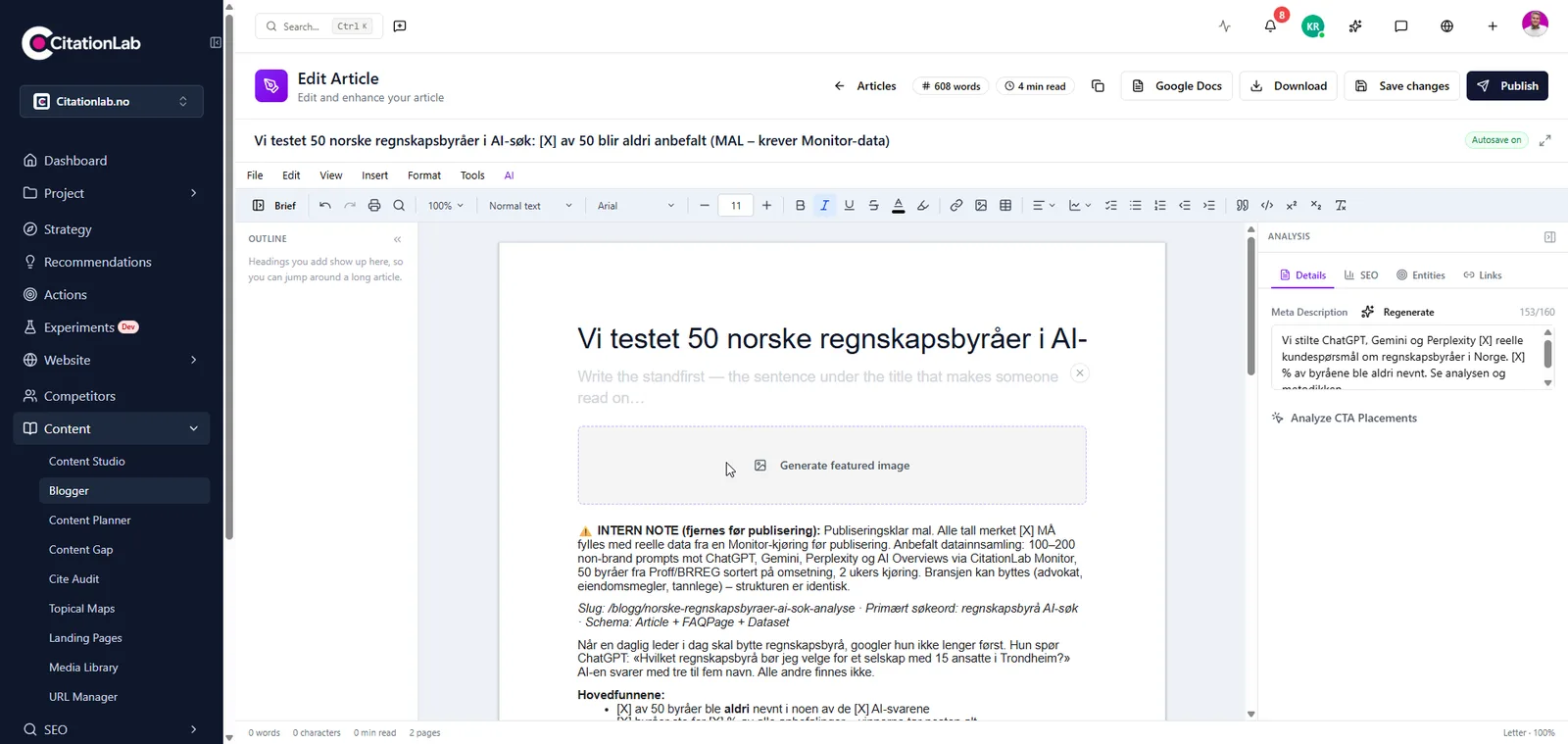
The brief takes the topic, keywords, persona, search intent, angle, the questions to answer and your own data, examples and quotes. The project's brand, personas and competitors are brought in, and you can ask for sourced research before the draft is written.
- 03 / 04
Check the text before it ships
The analysis panel reviews the article as it is on screen: SEO, readiness for answer engines, entities, readability, whether it reads as AI filler, and commercial value. If the project requires approval, a colleague has to approve the text before it can be published.
- 04 / 04
Publish and measure
The article goes straight to the connected CMS with its title, meta description and focus keyword. The publish is logged against the URL in URL Manager, and post-analysis measures the effect at 7, 14 and 28 days.
03Inside
What you get
A brief that produces text worth reading
Purpose, funnel stage, angle, points it must cover, questions it must answer, first-hand experience, things to avoid, the call to action and pages to link to. The brief is saved with the article, so you can adjust a field and generate again later.
Analysis while you write
Tabs for SEO, AEO, entities, readability, AI filler, sales, internal linking and keyword clusters. Findings point straight at the words they are about, and a tab computed on an older version of the text tells you so.
Approval and versions
Send the article to a colleague, who approves it or asks for changes. You can't approve your own text, and if it changes after approval it has to be approved again. Every save and generation is kept, so you can go back.
Publishing to eight CMSs
WordPress, HubSpot, Prepr, Contentful, Umbraco, Webflow, Wix and Sanity. Create and update posts and pages, and write SEO metadata, structured data, Open Graph and image alt text without logging in to the CMS.
Every URL you own in one table
URL Manager is the inventory of every page you own, with columns you define, pillar pages, clusters and a timeline per URL. Where a CMS is connected, you see the difference between what was planned and what is actually live.
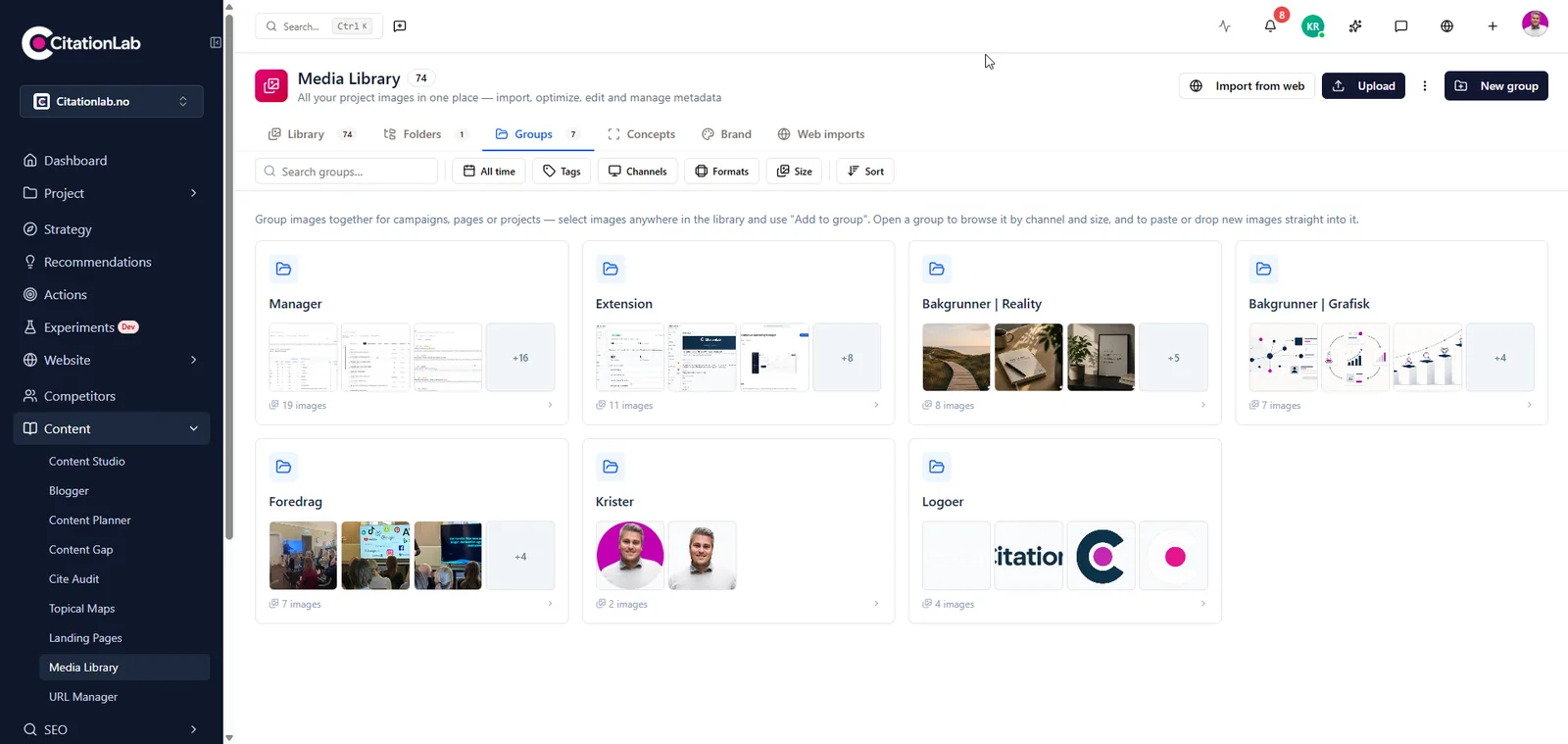
Your images in one place
The Media Library keeps images and video in folders, groups and brand roles. AI suggests titles, alt text, captions and tags, and for images already on your WordPress site you can improve alt text and filenames without breaking links.
From Manager
04The outcome
What it changes day to day
- Plan, brief, draft and publishing live in one project, not five tools
- Articles build on the personas, keywords and competitors you have already mapped
- Nothing goes out without a person approving it, when the project requires it
- Pages you already have get improved, not just joined by new ones
- Every publish can be measured, because it is logged against the URL it touched
05FAQ
Questions about content and publishing
- Which CMSs can I publish to?
- WordPress, HubSpot, Prepr, Contentful, Umbraco, Webflow, Wix and Sanity. Once a CMS is connected to the project it gets its own place in the menu, and content can be sent straight to it.
- Does the AI write the article for me?
- It writes a draft from your brief, grounded in the project's brand, personas and keywords. You edit, check and decide. The more you put into the brief, especially your own figures, examples and experience, the less generic the text.
- Can an AI agent publish content?
- Yes. An AI agent connected over MCP can write, update and publish in a connected CMS, with the same access as the user it acts for, and every change is logged. Approval, however, can't be given by an agent. If the project requires approval, a person has to vouch for the text.
- Does it help with content I already have?
- Yes. The Content Planner suggests existing pages worth improving, not only new articles, and in URL Manager you can mark pages to optimise, review or redirect. A page that already ranks is often quicker to lift than a new page is to build up.
- How do I know the content worked?
- Every publish through Manager is logged against the URL. Post-analysis compares before and after using Search Console and GA4 data at 7, 14 and 28 days, and you are told when the change was a clear win or a clear setback.
06More modules
It connects to everything else
- SEO and keywordsKeywords, daily rankings, technical audits, competitors and links in the same project as your content and AI visibility.
- Post-analysisAutomatically measures whether a change to a page actually moved clicks, traffic and conversions, after 7, 14 and 28 days.
- Cite AuditGoes through the content on your site and shows why AI engines cite you or pass you over, page by page, with concrete fixes.
- WordPress pluginA complete SEO plugin for WordPress with tools for AI search, connected to Manager so changes to your site are logged and measured.
Try content and publishing on your own site
Create an account and set up your first project in a few minutes.
Was this page helpful?